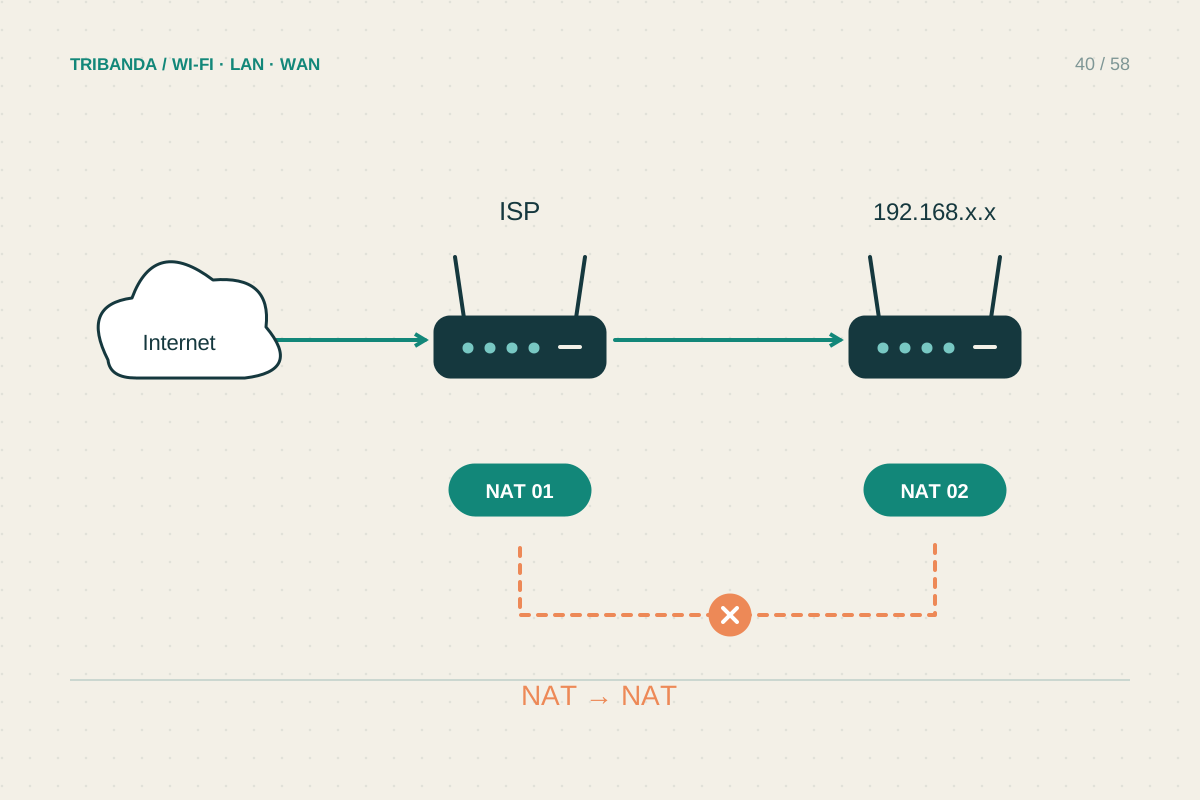
Double NAT often appears after adding a personal router or mesh kit behind the provider's router. Ordinary browsing may work, while hosting, remote access or some console features become awkward. The useful fix usually concerns which box routes the home network, rather than repeated changes to the console.
Confirm the layout
Draw the path from the provider connection to the modem-router, then to the new router or main mesh unit and finally to your devices. Check the new router's WAN address in its management interface. A private address there, while another home router is upstream, is a clue that both may be routing. Private address ranges include 10.x.x.x, 172.16.x.x through 172.31.x.x and 192.168.x.x. This observation alone does not identify every case: provider-side carrier-grade NAT can also prevent incoming connections even when the home has only one routing device.
Choose which device remains the router
If the provider router must remain responsible for internet access or telephone service, using the added mesh system in access-point mode is often the simpler arrangement. It extends the existing local network instead of creating another routed one. Check the manufacturer's mode comparison first: parental controls, port forwarding or other features may move to the upstream router or become unavailable in the mesh app. Alternatively, a provider-supported bridge or passthrough mode may let the personal router take over. Confirm internet settings, voice requirements and provider support before making that change, especially when the connection uses service-specific credentials or VLANs.
Verify the result you actually need
Save configurations and arrange a time when a temporary outage is acceptable. After the mode change, reconnect devices and check internet access, printing and any telephone service. Repeat the console's network test or the remote-access task that originally failed. Do not assume an improved NAT label means every application is fixed. Avoid stacking ad hoc DMZ and port-forwarding rules across both boxes without a clear purpose. Exposing a computer broadly is a poor substitute for understanding the layout. If the upstream address belongs to carrier-grade NAT, ask the provider about supported public-address options; changing your own router's mode cannot remove translation in the provider's network.
After simplifying the layout, label the device that now handles routing. This makes future changes to reservations and forwarding rules less confusing for whoever maintains the network.
Keep one clear routing boundary at home and verify the particular application that prompted the change.
Common questions
Does double NAT always slow browsing?
No. Many everyday outbound connections work through two routers. It is especially relevant to incoming reachability, hosting and some multiplayer arrangements.
Is access-point mode a Wi-Fi downgrade?
It changes routing responsibilities, not automatically the radio standard. The available features and mesh behaviour depend on the product, so check its documentation.
Original technical illustration; schematic, not to scale.