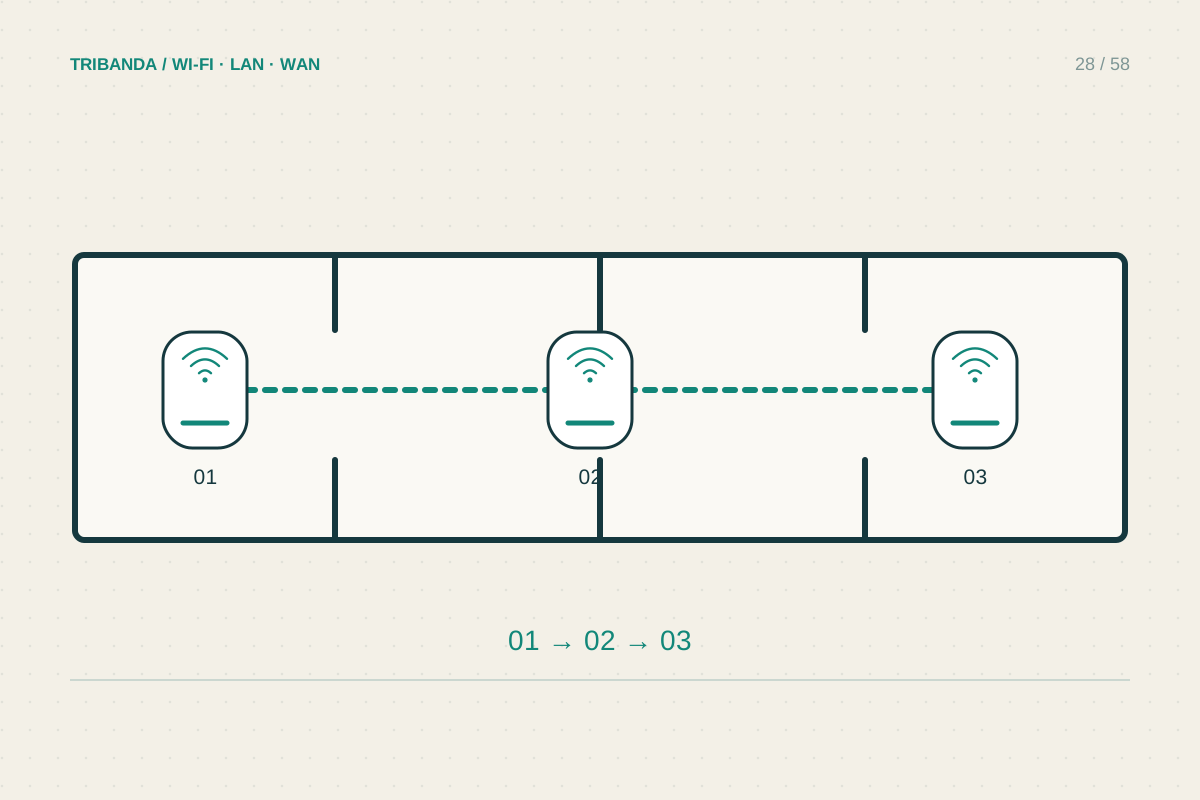
A long apartment can have a small floor area and a difficult radio path. When the internet enters at one end, the far bedroom may sit behind several walls despite being on the same floor. Mesh can help, provided each unit receives a useful connection from the rest of the network.
Map a chain of usable positions
Draw the entrance, hallway, occupied rooms and available sockets. Mark where a phone still works reliably on the original router, rather than starting with the final dead zone. A satellite needs a good upstream link as well as proximity to the room it serves. A strong local Wi-Fi symbol does not prove that upstream link is healthy.
Try intermediate positions near open doorways or an unobstructed corridor. Keep units out of wardrobes and away from large metal objects. A straight line on the drawing may pass through a bathroom wall or built-in cupboard, so inspect the real route. Test with doors in their normal positions, particularly the bedroom door you usually close.
Understand the route used by the satellites
A long layout may encourage one satellite to connect through another. Check the system application for each unit’s upstream source and connection quality. Do not assume it follows the chain you drew: systems may select another path automatically, and controls for choosing a source depend on model and firmware.
Each wireless stage still shares radio conditions with nearby devices and obstacles. Adding units at every doorway is not a reliable remedy for a weak first stage. Begin with the minimum arrangement that reaches the occupied rooms, then compare actual tasks before purchasing another node. Manufacturer area estimates cannot represent the sequence of walls in your flat.
Use one cable to change the geometry
If a practical Ethernet route reaches the middle or far end, a wired backhaul can remove the most difficult wireless stretch. This may let you place an access point or satellite near the room that needs it rather than halfway back towards the entrance. Confirm that the exact system supports Ethernet backhaul in the selected operating mode.
Follow the manufacturer topology rules when wiring several units. In router mode, equipment normally belongs downstream of the main routing unit; an existing provider router can change the appropriate arrangement. Label both cable ends and verify in the app that the intended backhaul is actually wired. A plugged-in cable alone does not establish that the topology is correct.
Test the last room and the journey to it
Use the same laptop at the far desk for repeated checks, then walk a normal call route with a phone. Record interruptions separately from maximum download speed. If the desk works but movement remains awkward, investigate roaming rather than adding hardware immediately. Keep one diagram showing node positions, the upstream links and any Ethernet connections so future changes remain understandable.
Treat the apartment as a sequence of links. Fix the weakest upstream stretch, and use Ethernet when it offers a clearer route to the far rooms.
Common questions
Should the final node go in the farthest bedroom?
Only if its upstream connection is good there. A nearer doorway or a wired connection may serve the bedroom better.
Does a narrow home always need three nodes?
No. Wall materials, placement and cable routes matter more than shape alone. Start small and measure the occupied rooms.
Original technical illustration; schematic, not to scale.