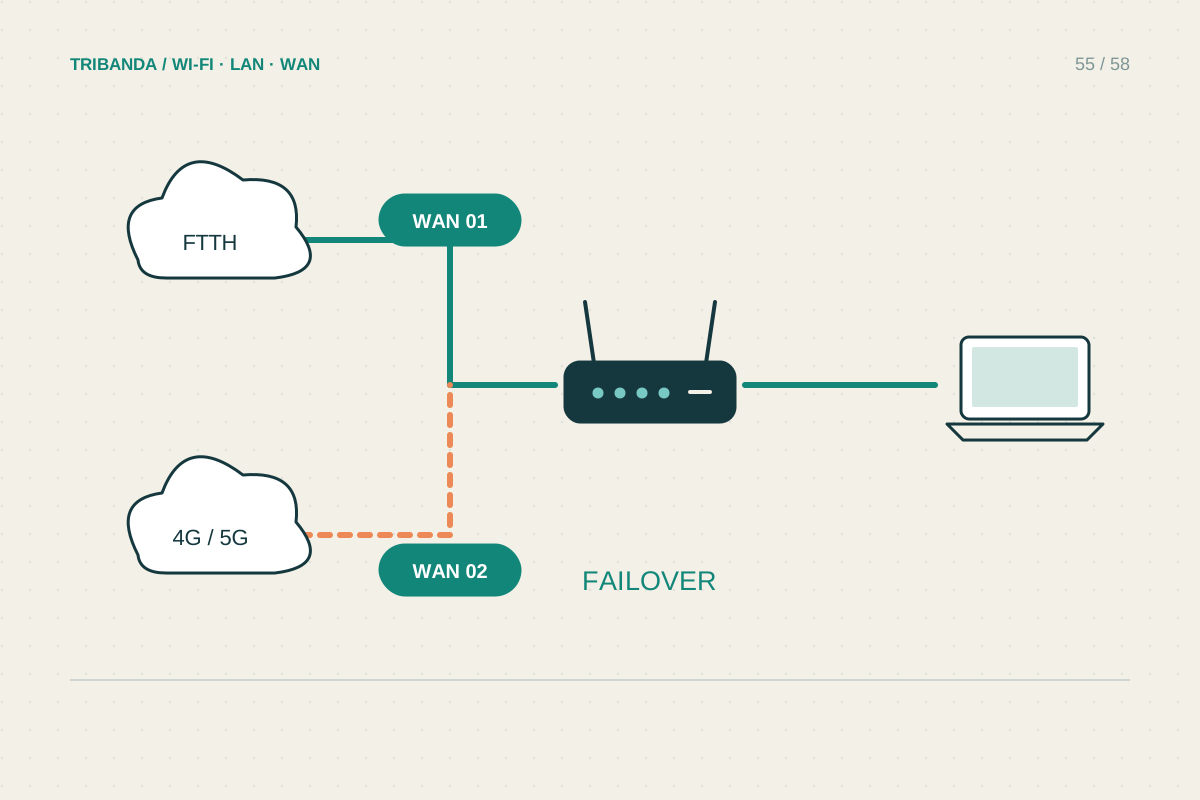
A backup line is valuable when it supports the essentials during a real outage. That can mean a phone hotspot for one laptop or a router with a second WAN connection. Start with the work you must continue and the failures you want to cover, rather than buying a second connection without testing it.
Choose the minimum useful service
List essential activities such as a work call, sending documents or messaging. Decide which devices need access and how long a likely outage lasts. Test mobile coverage at the actual desk, including upload and a normal call during busy hours. Signal bars alone do not establish usable capacity. Check the plan's data allowance, hotspot terms and any work-VPN compatibility. A backup using the same provider or physical access route may share failures with the main service. Diversity can help, but even different retail brands may use common infrastructure, so do not assume two subscriptions provide complete independence.
Pick a switching method you can maintain
A manual hotspot is simple for a single laptop and avoids configuring the whole home. Keep the phone charged and confirm that the computer remembers the intended hotspot securely. For whole-home continuity, check whether the router supports a second Ethernet WAN, a compatible USB modem or supported phone tethering. These options are model-specific. Failover switches to another connection when a health check detects a problem; load balancing distributes traffic and is a different function. Read how your router detects failure and how it returns to the primary line. A cable unplugged locally and a provider outage that leaves the link light on are not identical tests.
Rehearse and protect the data allowance
During an agreed quiet window, simulate a supported primary-link failure and observe which devices reconnect. Expect some ongoing calls, VPN sessions or downloads to break when the public address changes; automatic switching does not guarantee an uninterrupted application session. Test restoration to the main line as well. Pause large cloud backups, game updates and high-quality streaming while using metered fallback. Record the manual steps and make sure another household member can follow them. Keep power in the plan: a mobile router still needs electricity or a suitable battery, and a local power cut may also affect cellular infrastructure. Recheck the backup periodically rather than discovering an expired SIM during an important outage.
Keep the fallback's credentials available without the main line. A password stored only behind a cloud login that requires the failed connection can turn a ready backup into an avoidable delay.
A rehearsed fallback with adequate upload, available data and clear switching steps is more useful than an untested spare subscription.
Common questions
Will failover keep every call connected?
No. A changed route or public address can interrupt an existing session. Test the applications that matter and plan to reconnect when necessary.
Is a hotspot enough for a whole household?
It depends on coverage, plan and demand. For an outage, limiting use to essential devices often provides a more predictable result.
Original technical illustration; schematic, not to scale.